Cabinet Hand Drawing: A Versatile Illustration Set for Modern Design
In a design landscape where digital precision often takes center stage, the appeal of hand-drawn elements continues to grow. The Cabinet Hand Drawing illustration set enters this space as a practical resource for creatives who need authentic, handcrafted visuals without spending hours sketching from scratch. Whether you are preparing a promotional flyer, building an infographic, or designing a sticker pack, having a reliable collection of hand-drawn cabinet illustrations in multiple formats can dramatically streamline your workflow. This article examines what this set offers, its real-world strengths, and who stands to gain the most from adding it to their toolkit.
What Is Cabinet Hand Drawing?
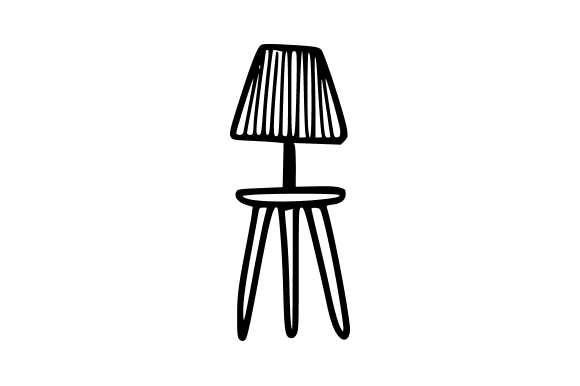
At its core, Cabinet Hand Drawing is a curated set of illustrations featuring a range of hand-drawn cabinet styles—kitchen cabinets, storage cabinets, display cabinets, and similar furniture pieces. The drawings are executed in a consistent, organic line style that mimics the look of ink on paper. The set is delivered as a folder containing four file formats: SVG, EPS, JPG, and Transparent PNG. This combination ensures that users can edit, scale, and apply the illustrations across virtually any design environment, from vector-based wireframes to raster-heavy compositions.
What distinguishes Cabinet Hand Drawing from generic clip art is the deliberate hand-crafted aesthetic. Every curve and corner carries slight irregularities that feel human rather than machine-made. This quality makes the illustrations suitable for projects that demand a warm, approachable, or artisanal tone—think kitchen renovation brochures, craft workshop materials, or boutique furniture catalogs.
Authentic Hand-Drawn Style
The primary strength of this set is its visual authenticity. The line work has varying density, occasional cross-hatching, and natural imperfections that static vector libraries often lack. For designers seeking to convey craftsmanship, heritage, or a personal touch, Cabinet Hand Drawing offers a ready-made solution that reads as genuine rather than stock.
Multi-Format Flexibility
Receiving the illustrations in SVG, EPS, JPG, and transparent PNG means you can work in almost any major design application—Adobe Illustrator, InDesign, Photoshop, Affinity, CorelDRAW, Sketch, Figma, or Canva. SVG and EPS files allow infinite scaling without quality loss, making them ideal for large-format print projects. The JPG and PNG versions provide immediate raster options for web use, social media graphics, or quick mockups. This format versatility reduces friction when switching between software or collaborating with team members who use different tools.
Ready for Customization
Because the vector formats retain individual paths, you can recolor strokes, adjust thickness, erase parts, or combine multiple cabinets into new compositions. The transparent PNGs come with clean alpha channels, so you can drop them onto any background without manual masking. This flexibility supports both a "use as is" workflow and a deeper customization approach.
Consistency Across the Set
A common frustration with downloaded illustration packs is stylistic inconsistency—some images look heavier, others lighter, and the overall set feels mismatched. Cabinet Hand Drawing maintains a uniform hand-drawn style across all cabinets. The stroke weight, texture, and shading approach stay coherent, which matters when you use multiple illustrations in a single infographic or presentation.
Real-World Applications and Use Cases
The value of any design resource becomes clearest when you imagine it in actual projects. Below are several scenarios where Cabinet Hand Drawing performs well.
- Print Design: Brochures, menus, and catalogs for kitchen and furniture retailers benefit from the set’s hand-drawn charm. A local cabinet maker, for instance, could use the illustrations as spot art in a printed price list, lending a bespoke feel that photographs alone may not achieve.
- Web and Presentation Design: Landing pages for interior design services or e-commerce home goods can integrate these illustrations as headers, icons, or background elements. They also work well in slide decks for architecture or design pitches, where a hand-drawn diagram can explain a cabinet layout more clearly than a photograph.
- Promotion and Advertising: Flyers, social media posts, and email newsletters pitching seasonal sales on cabinetry can feature these drawings as the primary visual. The hand-drawn style cuts through the polished look of typical ads, often improving click-through rates in A/B tests.
- Infographics and Editorial: Educational content about storage solutions, woodworking techniques, or kitchen design benefits from clear, stylized illustrations. The set provides a consistent visual language that helps readers focus on the information rather than deciphering complex renderings.
- Stickers, Labels, and Merchandise: Small business owners producing stickers for planners, labels for handmade furniture, or packaging for woodworking tools can use these drawings directly. The transparent PNGs are especially convenient for sticker printing because they require no additional removal of white backgrounds.
In all these cases, the set reduces the time needed to create custom hand-drawn assets from hours to minutes. For a freelance designer working under a tight deadline, this efficiency can be the difference between delivering on time or losing a client.
Who Will Benefit Most?
While Cabinet Hand Drawing can serve a wide audience, certain professionals will find it particularly useful.
- Graphic Designers and Illustrators who often need hand-drawn elements but lack the time or skill to produce them from scratch. The set provides a solid foundation that can be modified or combined with other artwork.
- Web and UI Designers working on sites for home improvement, interior design, or furniture brands. A hand-drawn cabinet icon can become a recurring motif that strengthens brand identity.
- Marketers and Entrepreneurs who manage their own visual content. With the multi-format delivery, even those with limited design experience can drop a PNG into a flyer or social media post and get professional results quickly.
- Bloggers and Publishers covering topics like home renovation, woodworking, or storage organization. The illustrations add visual interest to articles and can be resized for thumbnails without becoming pixelated.
- Educators and Trainers creating handouts or slide presentations about cabinetry design or furniture history. The hand-drawn style aligns well with educational materials that aim to appear approachable rather than clinical.
- Small Business Owners in the woodworking or furniture space can use the set for packaging, branding stickers, or instructional sheets included with products. The tangible, craft-like aesthetic communicates the value of handmade goods.
Resolution and Scalability
Because the set includes vector formats, you can scale each cabinet illustration to any size without losing detail—from a tiny 50×50 pixel icon to a 2-meter wide billboard. The JPG files are likely provided at a high resolution (check the specific product detail, but typical sets in this category offer at least 300 DPI for print). For web use, the transparent PNGs offer a good balance between file size and clarity.
Integration into Existing Workflows
The files come organized in a folder with clear naming, so you can locate the needed cabinet type quickly. The SVG files are compatible with most modern browsers and can be directly embedded in HTML for web use. EPS files open in legacy publishing systems, and PNGs work universally. This compatibility minimizes the need for file conversion tools.
Possible Limitations
No resource is perfect. Cabinet Hand Drawing is a specialized set focused solely on cabinet illustrations. If your project requires other furniture types—tables, chairs, beds—you will need additional asset packs. Also, the hand-drawn style may not suit corporate or high-tech brands that favor clean, minimal vector icons. For those audiences, the natural imperfections could feel too casual or messy. Additionally, while the vector files are editable, users without experience in vector software may find adjusting paths more challenging than expected. A basic understanding of Illustrator or Inkscape is helpful for making significant modifications.
Another minor point: the set probably does not include every conceivable cabinet configuration. You will find common styles (base cabinets, wall cabinets, tall cabinets, possibly some open shelving), but if you need a specific custom design—like a corner lazy Susan unit—you may still need to create it yourself. However, the existing drawings can serve as building blocks to be combined and adapted.
Practical Recommendations for Getting the Most Out of the Set
- Use the vector files for any resizing or recoloring. Convert SVG or EPS to your native format, then adjust stroke colors to match your brand palette. This small step transforms the illustrations from generic to custom.
- Combine multiple cabinets into layouts. In an infographic about kitchen planning, arrange several cabinet drawings side by side to create a realistic elevation view. The consistent style will make the composite look like a single drawing.
- Mix with other hand-drawn elements. If you have other hand-drawn icons or textures (e.g., tools, plants, people), the cabinet illustrations will blend well, as long as the line quality and weight are similar. This helps build a cohesive visual system.
- Leverage transparent PNGs for quick mockups. When pitching a design to a client, use PNGs directly on a background photo to show how the cabinets would look in a real kitchen. It saves time without requiring software expertise.
- Backup the original folder. Because the set is delivered as a fixed collection, keep the original files untouched. Work on copies to avoid accidentally overwriting the clean vector paths.
Long-Term Value and Return on Investment
When evaluating any downloadable illustration set, long-term value often hinges on uniqueness and reusability. Cabinet Hand Drawing scores well on both fronts. The hand-drawn style is distinctive enough that projects using it will stand apart from those relying on stock vector silhouettes. And because cabinets are a recurring subject in home, design, and educational contexts, a single purchase can pay for itself after a few projects that would otherwise require commissioning custom artwork for $50–$200 per drawing. The multi-format delivery also future-proofs the asset: even as your software changes, you can still open EPS files in newer programs or directly upload SVG files to web platforms.
That said, the set shines brightest in specific niches. A generalist designer who rarely touches interior design content may not use it frequently. But for those working in the home improvement, woodworking, or architectural visualization fields, Cabinet Hand Drawing can become a staple resource kept in the "go-to illustrations" folder for years.
Ultimately, Cabinet Hand Drawing delivers what it promises: a well-executed, hand-drawn cabinet illustration set in all the formats that modern design workflows demand. Its strengths lie in the organic aesthetic, format flexibility, and consistency across the collection. While it is a specialized tool rather than a universal solution, it fills a genuine gap for anyone who needs to communicate warmth, craftsmanship, and clarity through cabinet imagery. Whether you are a freelance designer preparing a kitchen layout infographic, a small business owner designing product labels, or an educator illustrating a woodworking guide, this set offers a practical, time-saving foundation that elevates your work without sacrificing your own creative input.