Green Future Company Profile Template for InDesign
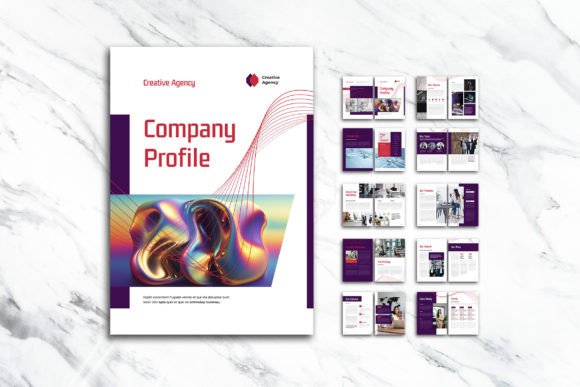
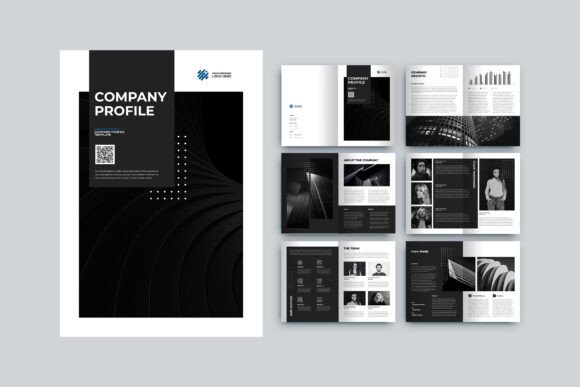
Presenting a business to potential clients, investors, or partners often comes down to how well you communicate your story on paper. A company profile is more than a list of services—it is a visual introduction to your brand, your values, and the people behind the work. The Green Future Company Profile template offers a polished starting point for anyone who wants to create a professional, image-rich document without spending weeks on layout design. Built for Adobe InDesign, this A4 template combines infographics, photography, and text in a clean, elegant structure.
Whether you are launching a startup, rebranding an established firm, or putting together a capability statement for a pitch, having a ready-made layout saves time and keeps the focus on content. This article walks through what the template offers, how it can be used across different contexts, and what to keep in mind before you begin customizing it.
What Green Future Company Profile Actually Is
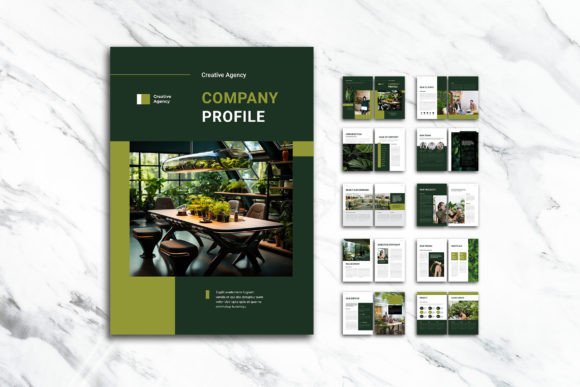
At its core, the Green Future Company Profile is a 12-page Adobe InDesign template designed for creating A4 company profiles. It comes as an INDD file (the native InDesign format) along with an IDML version for older versions of the software, plus a PDF document for previewing the final look. The layout includes front and back covers, leaving ten inside pages for your own content, images, and infographics.
The template uses CMYK color format at 300 DPI resolution, which means the output is suitable for professional printing. A 3 mm bleed is already set up, so your background colors and images extend to the edge of the page without leaving white borders after trimming. The fonts come from free sources such as DaFont or Google Fonts, so there are no additional licensing costs. Layers are neatly organized and labeled as smart layers, making it straightforward to edit text, swap images, or change colors without disrupting the rest of the layout.
This is not a one-size-fits-all brochure. It is a structured framework that balances visual elements like infographics and photographs with written content. The result is a document that feels both modern and trustworthy—exactly what a company profile should convey.
Who Benefits from Using This Template
The Green Future Company Profile template appeals to a broad range of people. Small business owners who need a professional document but lack a full design team will find the organized layers and pre-set styles helpful. Freelancers and consultants can use it to create a polished portfolio or service overview for client meetings. Marketers and entrepreneurs who want to present sustainability reports, annual summaries, or project case studies will appreciate the space for infographics and data visualization.
Beginners who are still learning Adobe InDesign will benefit from the clean structure. Because the template uses smart layers and free fonts, it reduces the friction of hunting for compatible resources. More experienced creators can use it as a foundation and push the design further by adding custom elements, brand colors, or unique typography. Educators and hobbyists may also find it useful for creating non-commercial documents such as event programs, community reports, or personal portfolios.
Practical Ways to Use the Template
The name suggests a focus on green or sustainable businesses, but the design is versatile enough to support many other purposes. A renewable energy startup could use the Green Future Company Profile to showcase project sites, team members, and environmental impact data. A consulting firm might fill the pages with client testimonials, case studies, and service breakdowns. A creative agency could treat the layout as a portfolio, letting high-quality images take center stage while using the infographic areas to explain workflow or results.
The template also works well for internal documents. For example, a non-profit organization could create a volunteer handbook or annual impact report using the same structure. The infographic panels are especially useful for presenting statistics, timelines, or comparison charts in a way that does not overwhelm the reader. Because the layout already includes a cover and back cover, the document feels complete from the moment you start editing.
For entrepreneurs who pitch to investors regularly, having a consistent profile format saves time. You can update the content for each pitch without rethinking the layout. The same applies to freelancers who want to send a one-page or multi-page capability statement to potential clients. The Green Future Company Profile template handles both short and moderately detailed presentations well, as long as you keep the content focused.
What Makes the Template Valuable
One of the strongest aspects of this template is the balance it strikes between visual appeal and clarity. Many company profiles fall into two extremes: either they are text-heavy and boring, or they are image-heavy and lack substance. The Green Future Company Profile avoids both by mixing infographics, photographs, and written content in a structured way. This makes it easier for readers to scan the document, find key information, and connect with the brand visually.
The pre-set 300 DPI resolution and CMYK color space are important details if you plan to print the document. Many beginners overlook these settings and end up with blurry images or colors that look different on screen versus in print. Having them already configured saves a round of frustration. The 3 mm bleed is another practical feature that ensures your background elements extend correctly to the edge of the page after trimming.
Smart layers are another time-saver. Instead of digging through dozens of unnamed layers, you can quickly locate the text box, image frame, or shape you need to edit. This is especially helpful if you are new to InDesign or if you are working under a tight deadline. The template's layer organization follows a logical structure, so you can focus on content rather than troubleshooting the file.
Important Things to Consider Before You Start
While the Green Future Company Profile template is friendly to beginners, there are a few things to keep in mind. First, you need access to Adobe InDesign. The file will not open in free alternatives like Canva or Publisher. If you do not already have InDesign, consider a Creative Cloud subscription or a trial period to customize the template. Once the edits are complete, you can export the final PDF for sharing or printing.
The images shown in the preview are not included in the download. This is standard practice for layout templates, but it means you need to source your own photographs, illustrations, or icons. Plan ahead by gathering your visual assets before you start editing. Free stock photo sites or your own photography work well. If your brand has specific color guidelines, you will need to adjust the template's color swatches to match. Because the file uses CMYK, the color shifts will be minimal compared to RGB-based designs.
Another consideration is the page count. The template offers 12 pages including covers, which gives you ten inside pages. If your content runs longer or shorter, you may need to add or remove pages. InDesign makes this easy, but keep in mind that the layout flow and infographic placements may need slight adjustments when you change the length.
Font licensing is simple because the template uses free fonts from DaFont or Google Fonts. However, you should still download and install the specific fonts listed in the documentation before opening the file. Missing fonts can cause text to reflow or appear incorrectly. The template's documentation should include font names and download links.
How to Get the Most Out of the Layout
Start by reviewing the included PDF preview to understand the intended flow. Then open the INDD or IDML file in InDesign and explore the layers panel. Replace placeholder images with your own, update the text placeholders with your company information, and adjust colors to match your brand palette. The smart layers make these changes straightforward, but take your time to ensure that the infographics still communicate clearly after your edits.
Think about your audience as you customize the Green Future Company Profile. If readers are scanning the document quickly, keep headings short and use the infographic areas to highlight key numbers or milestones. If the document is meant to be read cover to cover, write concise paragraphs that support the visuals rather than competing with them. The template is designed for both scenarios, so trust the layout and focus on clear writing.
For those who plan to distribute the profile digitally, export as a PDF with compression settings suited for screen viewing. If you intend to print, request a physical proof or test print from your printer before running the full batch. The 300 DPI and CMYK settings give you print-ready quality, but small adjustments in color or contrast may still be needed depending on the paper stock and printer.
Final Thoughts on the Green Future Company Profile Template
The Green Future Company Profile offers a solid foundation for anyone who needs to create a professional, image-rich company document without starting from scratch. Its combination of infographic panels, photo placement, and clean typography makes it suitable for businesses, freelancers, non-profits, and creative professionals alike. The smart layers, free fonts, and print-ready settings reduce the technical hurdles that often slow down layout work.
If you have a clear idea of your brand story and the visuals to support it, this template can help you produce a polished profile in a fraction of the time. Focus on your content, let the layout do the heavy lifting, and you will have a document that represents your work with the style and clarity it deserves.