White Purple Elegant Company Profile: A Versatile InDesign Template for Professional Brand Presentations
Presenting a company's identity, services, and values in a printed or digital document requires more than just good content—it demands a structure that communicates professionalism and visual coherence. The White Purple Elegant Company Profile template for Adobe InDesign offers a refined solution for those who want to combine imagery, infographics, and text in a layout that feels both stylish and purposeful. Whether you are a freelancer preparing a portfolio, a small business owner crafting a corporate brochure, or a designer working with multiple clients, understanding what this template provides and how it fits into different workflows can help you make an informed decision.
What Is the White Purple Elegant Company Profile?
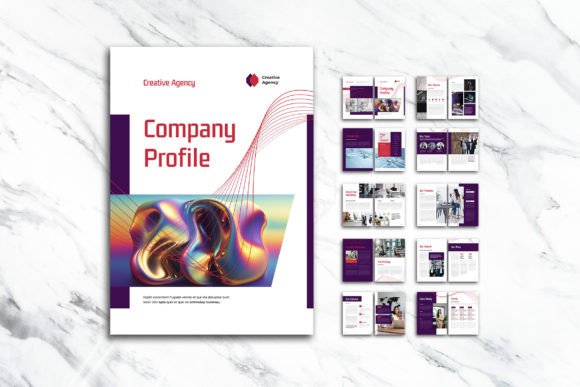
This is a ready-to-use InDesign template designed specifically for creating A4-sized company profiles. It comes with 12 custom pages, including a front cover and a back cover, and is structured to support a blend of visual elements—photographs, infographics, and text blocks—in a clean, elegant style. The color palette centers on white and purple, giving the document a calm yet distinctive look that suits a wide range of industries, from creative agencies and consulting firms to health and wellness brands.
The template is delivered in INDD and IDML formats, making it compatible with most versions of Adobe InDesign. It also includes a PDF preview so you can see the intended layout before you start editing. The design uses a CMYK color format at 300 DPI, with a 3 mm bleed, ensuring that the final print output meets professional standards.
Core Features That Define the Template
The White Purple Elegant Company Profile is built around several practical features that streamline the design process and enhance the final result:
- 12 custom pages – The layout includes a front cover, back cover, and ten interior pages, giving you ample space to introduce your company, showcase services, present team members, display client testimonials, and include contact information.
- Smart Layer organization – All layers are neatly named and structured, so you can locate and edit specific elements without disrupting the rest of the design. This is especially helpful when working with multiple images or text blocks.
- Free fonts from DaFont or Google Fonts – The template uses freely available typefaces, so you do not need to purchase expensive font licenses. You can easily replace them with your preferred fonts if needed.
- A4 size with bleed – The 29.7 cm x 21 cm format is standard for corporate documents, and the 3 mm bleed ensures that colors and images extend to the edge of the page after trimming.
- CMYK color and 300 DPI – These settings are essential for high-quality printing, ensuring that colors appear consistent and images remain sharp.
Who Benefits Most From This Template?
While the template is marketed broadly, certain groups are likely to find it especially valuable:
- Freelance designers – If you work with multiple clients who need a company profile, having a customizable template saves hours of setup time. You can adapt the color scheme, replace images, and adjust text without starting from scratch.
- Small business owners – For entrepreneurs who want a professional-looking document but lack design experience, this template provides a solid foundation. You can edit it in InDesign or use the IDML file to open it in earlier versions of the software.
- Marketing and communications teams – When you need to produce consistent branding materials across different departments, a template ensures uniformity while allowing each team to customize content.
- Creative professionals – Photographers, architects, artists, and consultants can use the profile to present their portfolios, case studies, or service packages in a visually cohesive format.
Real-World Applications and Scenarios
Understanding how the White Purple Elegant Company Profile performs in actual use helps clarify its strengths and limitations. Consider the following scenarios:
Scenario 1: A Boutique Branding Agency
A small branding agency with a focus on minimalist design uses the template to create a company profile for a prospective client. The white and purple palette aligns with their own brand colors. They replace placeholder images with their own photography, adjust the infographic sections to display their process, and add client logos to the testimonial page. The result is a polished, print-ready document that they hand out during client meetings. Because the template uses smart layers, they are able to make changes quickly when the client requests a different ordering of services.
Scenario 2: A Health and Wellness Coach
A wellness coach who prefers digital distribution uses the same template to create a PDF company profile for their website. They replace the purple tones with a softer lavender to match their logo, add icons representing their services, and include a page for client success stories. The 300 DPI resolution ensures that the file remains crisp when viewed on screen. The template's structure helps them present their credentials and approach in a clear, scannable format that potential clients appreciate.
Scenario 3: An In-House Design Team at a Consulting Firm
A consulting firm's design team needs to produce company profiles for three different departments. Using the White Purple Elegant Company Profile template, they create a master layout and then duplicate it, making adjustments for each department's focus. The consistent format reinforces the firm's brand identity, while the flexible page structure allows each department to highlight different types of information—case studies for one, team bios for another, and service breakdowns for the third.
Strengths and Practical Advantages
Several qualities make this template stand out among similar offerings:
- Ease of customization – Because layers are organized clearly, you can swap images, edit text, and adjust colors without accidentally moving other elements. This reduces frustration and saves time, especially if you are not an InDesign power user.
- Print-ready specifications – The CMYK color mode, 300 DPI resolution, and 3 mm bleed mean that files produced from this template can be sent directly to a commercial printer with minimal preparation. This is a significant advantage for anyone who needs physical copies for events, client meetings, or trade shows.
- Versatile layout – The template is designed to accommodate both images and infographics, making it suitable for businesses that rely on data visualization—such as agencies presenting campaign results or consultants showing growth metrics.
- Elegant visual style – The white and purple color scheme is neutral enough to work with many brand palettes while still offering a distinctive look. It avoids the overly corporate feel of some templates, making it appropriate for creative and lifestyle brands as well.
Considerations and Limitations
No template is perfect for every situation, and being aware of potential drawbacks helps you decide whether this one fits your project:
- Requires Adobe InDesign – This template is not compatible with Canva, Microsoft Publisher, or other page layout tools. If you do not have access to InDesign, you will need to use the PDF only as a reference and recreate the layout manually in another program.
- Images are not included – The preview images you see in the template listing are for demonstration only. You must supply your own photographs, icons, and graphics. For users who lack a library of high-quality images, this means additional time and possibly extra cost.
- Fonts must be downloaded separately – While the fonts are free, you still need to download and install them before you can edit the template. Some users may prefer templates that include embedded fonts for immediate use.
- Fixed page count – The template includes 12 pages. If your content requires more or fewer pages, you will need to duplicate or remove pages manually, which can affect the overall flow and design consistency.
- Color scheme may not suit all brands – Although white and purple are adaptable, they lean toward a softer, more elegant aesthetic. Industrial, tech, or highly formal corporate brands might require a different palette that feels more robust or conservative.
Evaluating Whether This Template Is Right for You
Before committing to the White Purple Elegant Company Profile, consider your specific needs and constraints:
- What software do you have? – If you own Adobe InDesign (or have access to it through a subscription), this template is a practical choice. If not, you may need to look for alternatives that work with your existing tools.
- What is your branding style? – The white and purple palette works best for brands that want to convey elegance, calmness, or creativity. If your brand uses very different colors, you can adjust the template, but be prepared to spend time modifying the color scheme across all pages.
- What is your distribution method? – For print, this template's CMYK and 300 DPI settings are ideal. For digital-only use, those settings still produce high-quality PDFs, but you may also want to consider whether you need interactive elements like hyperlinks or embedded videos, which this template does not include.
- How much content do you have? – The 12-page structure is well-suited for medium-sized profiles. If you have very little content, you might end up with sparse pages; if you have extensive content, you may need to add pages and adjust the layout.
- What is your design skill level? – Beginners will appreciate the organized layers and clear structure, but some familiarity with InDesign is still necessary for making effective changes. If you are new to the software, plan to invest a few hours learning the basics before starting.
Practical Tips for Getting the Most Out of the Template
Once you decide to use the White Purple Elegant Company Profile, a few practical steps can help you achieve the best results:
- Prepare your images in advance – Crop and resize your photos to match the template's dimensions where possible. This saves time during the layout phase and ensures consistency.
- Choose fonts that complement the design – The free fonts recommended by the template are a good starting point, but feel free to experiment with other options that align with your brand voice. Keep readability a priority for body text.
- Use the smart layers efficiently – Lock layers you are not editing to avoid accidental changes. Name any new layers you add so the structure remains clear for future edits.
- Test print before final production – Even though the template is print-ready, always request a proof from your printer to check colors and bleed before running a large batch.
- Consider digital interactivity – If you plan to share the profile as a PDF on your website, consider adding hyperlinks to your email, phone number, or social media pages. You can do this in InDesign before exporting.
Final Thoughts
The White Purple Elegant Company Profile template offers a well-structured, professionally styled foundation for anyone who needs to create a company profile in Adobe InDesign. Its thoughtful feature set—smart layers, print-ready specs, and versatile layout—makes it a practical choice for freelancers, small businesses, and in-house teams alike. While it does require access to InDesign and some basic design skills, the time saved in setup and the consistency it brings to the final document often outweigh these considerations. By understanding both the strengths and limitations outlined here, you can decide whether this template aligns with your project goals and then use it effectively to present your brand in a polished, elegant format.