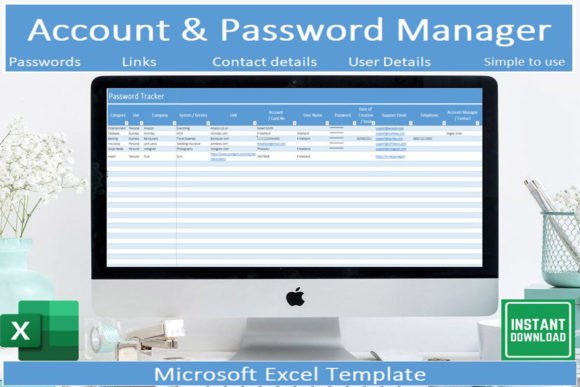
Simple Account Password Tracker
When you manage dozens of online accounts, remembering every password, username, and associated email becomes a genuine challenge. You might rely on browser auto-fill, keep sticky notes tucked in a drawer, or default to a few passwords you reuse everywhere. None of these approaches scale well, and each introduces risk or friction. The Simple Account Password Tracker for Microsoft Excel offers a straightforward, no-fuss alternative that fits into your existing workflow without requiring a new app subscription or a steep learning curve. This is a tool designed for people who want clarity, control, and quick access to their account information without the overhead of a full password manager.
Why a Dedicated Tracker Matters for Your Online Life
Even if you use a password manager for critical services, there are countless accounts that fall outside its scope: store loyalty programs, newsletter subscriptions, community forum logins, utility portals, and guest accounts on collaborative tools. These secondary accounts accumulate over time, and when you need to access one urgently, the time spent resetting passwords or searching for credentials adds up. The Simple Account Password Tracker fills that gap by giving you a single, local file where you can record each account’s details in a consistent format. By keeping this information organized, you reduce the mental load of remembering which email you used for which service and decrease the likelihood of locking yourself out.
More importantly, a tracker like this helps you maintain accurate records. When you change a password or update your email address, you can reflect that change immediately in the spreadsheet. Over weeks and months, that habit keeps your account inventory reliable. You avoid the frustration of discovering that the credentials you saved no longer work because you forgot to update them.
What the Simple Account Password Tracker Template Includes
The template comes as a digital download that works in Microsoft Excel. It includes a pre-built table with all the columns you are likely to need: website or service name, username, password, associated email, category, notes, and a date field for when the record was last updated. Drop-down lists help you categorize each entry quickly, whether it falls under finance, social media, work tools, entertainment, or a custom group you create. This classification system speeds up data entry and makes filtering straightforward later.
The template also comes with clear instructions explaining what each column represents and how to use the sorting, filtering, and search features. If you are moderately comfortable with Excel, you can start adding your accounts within minutes. The design is minimal on purpose: there are no macros, no complex formulas, and no external data connections. You simply type or paste your information into the cells, choose a category from the drop-down, and move on to the next entry.
Because the file lives on your device or cloud storage, you control where it is stored and who has access. You can keep it on your laptop, sync it via OneDrive or Google Drive, or open it with the free Microsoft Excel mobile app to view and update records on your phone. This flexibility matters when you sign up for a service on the go and want to log the details immediately rather than relying on memory.
How the Tracker Saves Time and Reduces Frustration
Filtering and sorting are where this template truly shines. Once you have entered a dozen or more accounts, scrolling through an unsorted list becomes inefficient. With the built-in filters, you can narrow the view to a single category, such as banking or shopping, and see only the relevant rows. If you need to find a specific service, the search function lets you type part of the name and jump directly to it. This targeted access means you spend seconds locating credentials instead of minutes digging through emails or resetting passwords.
The drop-down lists also reduce typing errors. When you categorize an account, you pick from a predefined set of options instead of typing freeform text that might be misspelled or inconsistent. Over time, this consistency makes your data easier to analyze. For example, you can quickly see how many accounts you have under social media or identify which category contains the oldest entries that may need a password refresh.
For professionals and entrepreneurs who manage multiple business accounts, the efficiency gains are tangible. A freelancer might have separate logins for project management tools, invoicing platforms, client portals, and communication apps. Having all those credentials in a searchable spreadsheet means less friction when switching between tasks and fewer interruptions to your workflow.
Who Benefits Most from This Approach
The Simple Account Password Tracker is especially valuable for people who prefer a local, offline solution and do not want to rely on a cloud-based password manager for every single account. Bloggers, educators, and content creators often maintain numerous platform accounts for publishing, analytics, advertising, and community management. A spreadsheet gives them a unified view of all those logins without the cost or complexity of enterprise tools.
Small business owners and marketers frequently delegate account access to team members or contractors. With the tracker, you can keep a master list of credentials that you share selectively, and because the file is in Excel, you can add columns for notes about shared access or expiration dates. This transparency helps you stay on top of who has access to what and when accounts need to be reviewed.
Hobbyists and consumers also find genuine utility here. If you have accounts for streaming services, online forums, e-commerce sites, and subscription boxes, the tracker helps you remember which services you are paying for and how to log in. During a subscription audit, you can review the list and decide which accounts to keep, cancel, or update. This practice can save money and reduce digital clutter.
Practical Tips for Getting the Most from the Template
Start by entering your most frequently used accounts first: email, banking, social media, and work tools. Once those are recorded, add the less critical ones gradually. The goal is to build a complete inventory over time rather than attempting to transfer everything at once. Use the notes column to record security questions, two-factor authentication backup codes, or the email address associated with the account if it differs from your primary one.
Consider creating a naming convention for your entries so that similar services appear together when sorted alphabetically. For instance, if you have multiple Google services, you might list them as Google – Gmail, Google – Drive, Google – Analytics. This simple convention makes filtering more intuitive and prevents duplication.
Take advantage of the date column. When you update a password, change the date to the current day. Over time, you can sort by date to see which accounts have not been updated in months. Those are often the ones that need attention, either because they are no longer used or because the credentials may be outdated.
Store the file in a location you trust and consider enabling password protection on the Excel file itself. While the template does not include built-in encryption, Excel offers a native option to require a password to open the workbook. This adds a basic layer of security that keeps your credentials safe if the file falls into the wrong hands.
Limitations to Consider
The Simple Account Password Tracker is a spreadsheet, not a dedicated password manager. It lacks features like automatic password generation, browser integration, cloud sync across all devices, and shared vaults for teams. If you manage dozens of accounts that require high-security standards, you may want to use a dedicated password manager as your primary tool and keep the tracker for secondary accounts or as a backup record.
Because the file is stored locally or in your cloud folder, you are responsible for backups. If you lose the file or accidentally delete a row, the information is gone unless you have a copy. Make it a habit to back up the tracker periodically, especially after adding a batch of new accounts.
Mobile editing is possible through the free Excel app, but the experience is less fluid than on a desktop. Entering long passwords on a phone screen can be tedious, and the drop-down lists may require extra taps. If you update accounts frequently from your phone, test the workflow first to see if it meets your needs.
Keeping Your Accounts in Order
Staying organized with your account details does not require a complex system. The Simple Account Password Tracker gives you a clean, editable, and searchable structure that works within a tool you already own. By investing a small amount of time upfront to populate the spreadsheet and maintain it as you go, you remove a recurring source of friction from your daily routine. Whether you are a freelancer juggling client portals, a small business owner tracking vendor logins, or someone who simply wants a better way to manage personal accounts, this template provides a practical foundation. Use it as your central reference, update it consistently, and you will find that the small effort of recording each account pays back in saved time and reduced stress every time you need to log in somewhere.