LYMO Minimal GoogleSlide Template: A Practical Evaluation for Professionals, Lecturers, and Students
When you need to create a presentation that looks polished without spending hours on design, template choices matter a great deal. Among the many options available, the LYMO Minimal GoogleSlide Template has drawn attention from a broad range of users, including business professionals, university lecturers, and students preparing reports. But before you commit to any template, it is worth examining what this particular offering actually delivers, where it excels, and where it might fall short for your specific needs. This article provides a balanced, decision-focused evaluation so you can determine whether LYMO aligns with your presentation goals.
What Is the LYMO Minimal GoogleSlide Template?
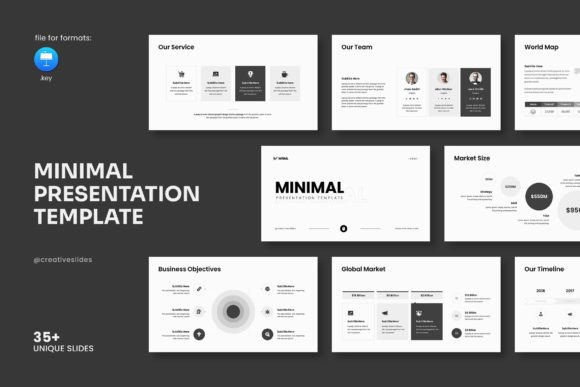
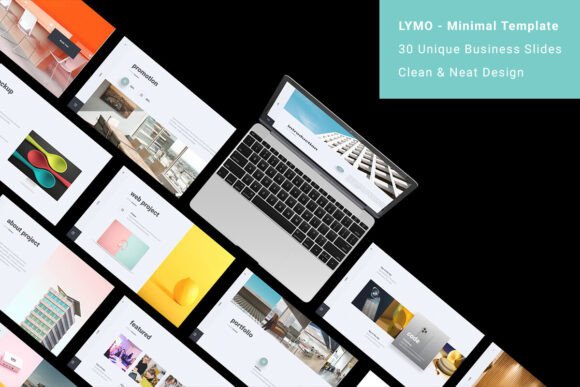
The LYMO Minimal GoogleSlide Template is a fully animated, vector-based presentation template built specifically for Google Slides. It comprises 30 creative slides, each designed with a clean, smooth aesthetic and a 16:9 aspect ratio that works well on modern screens. The template is responsive, meaning it adapts reasonably well across different devices, and it includes a full screen mode for distraction-free presenting. Beyond the visual design, LYMO offers a range of functional elements such as master slide options, easy drag-and-drop image replacement, an icon library, a font collection, and support for essential presentation components like portfolios, team work sections, infographics, and charts. The package also comes with full documentation and an online video tutorial, which can reduce the learning curve for less experienced users.
Who Might Find LYMO Useful, and Why?
Understanding the target audience helps clarify whether a template is worth your time. The LYMO Minimal GoogleSlide Template is marketed toward three primary groups: professionals presenting company potential, lecturers seeking to hold audience attention, and students reporting on projects or research. Each group has distinct needs, and LYMO attempts to address them with a single design framework.
For a professional who needs to convey a company's value proposition clearly, the clean vector shapes and minimal layout reduce visual clutter. This can help keep the audience focused on key messages rather than distracting design elements. For a lecturer, the animated slides and smooth transitions can add a dynamic layer to presentations, potentially improving student engagement during longer sessions. For a student, the pre-built slides for infographics, charts, and team work sections can save significant time when structuring a report, especially if design is not their strength.
What Are the Main Benefits of Using This Template?
When evaluating any presentation template, it helps to look at the tangible advantages it offers. The LYMO Minimal GoogleSlide Template provides several practical benefits worth noting.
Time Savings Through Pre-Built Structure
One of the most immediate benefits is the reduction in time spent on slide layout decisions. With 30 slides already structured for different purposes, you can focus on content rather than wireframing each slide from scratch. The master slide option further streamlines this by allowing you to apply global changes across all slides at once, which is especially useful when you need to maintain consistent branding or formatting throughout a long presentation.
Ease of Use for Non-Designers
The drag-and-drop image replacement and simple editing workflow mean that even someone with minimal design experience can produce a visually coherent presentation. The icon library and font collection also remove the need to source external assets, which reduces friction during creation. For students and early-career professionals who may not have access to premium design tools, this can be a significant advantage.
Versatile Content Sections
Including portfolio, team work, infographic, and chart slides makes the template suitable for a variety of presentation contexts. You are not locked into a single format like a pitch deck or a lecture outline. Instead, you can mix and match sections to create a custom flow that fits your specific topic. This flexibility is one of the stronger selling points of the template.
Animation and Visual Polish
Fully animated slides, when used appropriately, can make a presentation feel more professional and engaging. The animations in LYMO are described as smooth and built into the vector shapes, which means they are likely to function reliably within Google Slides without requiring manual animation setup. For lecturers and business presenters who want to add visual interest without learning animation software, this is a practical benefit.
What Are the Tradeoffs and Limitations to Consider?
No template is perfect for every situation, and the LYMO Minimal GoogleSlide Template has several tradeoffs that you should weigh before deciding to use it.
Limited Customization for Advanced Users
While the easy editing features are helpful for beginners, experienced designers or branding specialists may find the template restrictive. The pre-set vector shapes and slide layouts impose a certain visual structure that may not accommodate highly specific or unconventional design requirements. If you need to create a presentation that breaks away from the minimal aesthetic or requires custom-coded elements, LYMO might feel limiting rather than freeing.
Dependence on Google Slides
This template is built specifically for Google Slides. If you typically use PowerPoint, Keynote, or other presentation software, you will either need to work within Google Slides or accept potential formatting loss during conversion. For organizations that have standardized on a different platform, this could be a dealbreaker. Similarly, if you need advanced offline editing features that Google Slides lacks—such as complex chart linking or advanced animation triggers—you may find the template underpowered.
Animation Quality and Performance
Although the template advertises fully animated slides, the actual animation quality depends on Google Slides' native capabilities. Google Slides animations are generally simpler than what is possible in PowerPoint or After Effects. If your presentation relies heavily on sophisticated motion graphics or precise timing, the LYMO Minimal GoogleSlide Template may not deliver the level of polish you expect. Additionally, presentations with many animated elements can sometimes lag on older hardware or slower internet connections, which is worth testing beforehand.
Template Commonality
Because LYMO is a commercially available template, it is possible that your audience has seen similar designs before. If you are presenting in a competitive context—such as a business pitch where uniqueness matters—a template that looks like many others might work against you. Customization can mitigate this, but the base design will always carry some degree of familiarity.
When Is LYMO a Strong Fit for Your Needs?
Choosing a template should be driven by your specific context. Here are several scenarios where the LYMO Minimal GoogleSlide Template is likely to be a sensible choice.
- You are new to presentation design. If you have limited experience with slide layout and want a reliable starting point, the structured slides and drag-and-drop features make the learning curve manageable. The included documentation and video tutorial further support this use case.
- You need a presentation quickly. When deadlines are tight, having 30 pre-built slides that you can populate with your own content is a practical advantage. The master slide option also allows for rapid global edits, saving additional time.
- Your content benefits from visual variety. If your presentation includes data, team profiles, portfolio showcases, or infographic elements, the template's built-in sections reduce the need to design these components from scratch. This is especially useful for students or lecturers covering diverse topics in a single session.
- You prioritize clarity over flair. The minimal design approach means your audience's attention stays on your message rather than on decorative elements. For corporate updates, academic reports, or informational sessions, this can be a strength.
When Might Alternatives Be Worth Considering?
Conversely, there are situations where another template or approach may serve you better.
- You require deep brand customization. If your organization has strict brand guidelines with specific colors, fonts, and layout rules that deviate from the template's defaults, you may spend more time overriding LYMO's settings than building from scratch. A fully customizable blank template or a custom-built presentation might be more efficient.
- You need advanced multimedia integration. If your presentation relies heavily on video backgrounds, interactive elements, or complex data visualizations that go beyond basic charts, Google Slides' native limitations will eventually become a barrier. In that case, PowerPoint or dedicated presentation software with a more flexible template might be a better fit.
- You are presenting to a design-savvy audience. For creative professionals, designers, or clients who value originality, a commercially available template may feel generic. In such contexts, investing in a custom design or a less widely used template could leave a stronger impression.
- You work offline frequently. Google Slides requires an internet connection for full functionality, including animation playback and font rendering. If you often present in environments with unreliable connectivity, a template designed for offline-first software like PowerPoint or Keynote would be more dependable.
Practical Decision-Making Insights
To determine whether the LYMO Minimal GoogleSlide Template aligns with your goals, ask yourself a few focused questions before purchasing or downloading.
What is your primary presentation platform? If you already use Google Slides regularly and are satisfied with its capabilities, LYMO is a natural fit. If you are trying to use a Google Slides template on another platform, expect compatibility issues.
How much time are you willing to invest in customization? The template is designed for efficiency, but if you plan to heavily modify the layouts, colors, or animations, the time savings diminish. Consider whether the pre-built structure solves more problems than it creates for your specific content.
What impression do you want to leave? For clarity and professionalism in straightforward presentations, LYMO works well. For high-stakes pitches or creative showcases where distinctiveness matters, consider whether the template's aesthetic supports or undermines your message.
Do the included sections match your content needs? Review the slide types available in the template. If you need specialized slides that are not included, such as product comparison tables, process flows, or detailed financial projections, you will need to build them yourself. The template provides a solid foundation but not every possible layout.
Final Considerations Before Choosing LYMO
The LYMO Minimal GoogleSlide Template occupies a practical middle ground in the presentation template market. It is not a one-size-fits-all solution, but it is a well-rounded option for users who want a clean, animated, Google Slides-native template with versatile content sections. Its strength lies in reducing the time and skill required to produce a professional-looking presentation, especially for those who do not specialize in design. Its limitations emerge when users need deep customization, advanced multimedia features, or platform independence.
For a professional presenting company potential, a lecturer aiming to capture attention, or a student compiling a report, LYMO offers a reasonable balance of form and function. The key is to match the template's capabilities to your specific context rather than expecting it to solve every presentation challenge. By understanding both what it provides and where it falls short, you can make an informed choice that supports your actual presentation goals rather than just following a trend.