Velgo Keynote Template: Polished Presentations Made Easy
Building a presentation from scratch is a time-consuming process. You need to balance structure, visual appeal, and a cohesive narrative, all while ensuring your audience stays engaged. The Velgo Keynote Template addresses this challenge directly. With 150 total slides spread across 5 distinct color variations, it provides a design system rather than a simple set of backgrounds. For professionals who regularly deliver pitches, training sessions, or client updates, having a reliable template like Velgo can streamline your workflow and elevate the quality of your communication.
Designing for Consistency Without Repetition
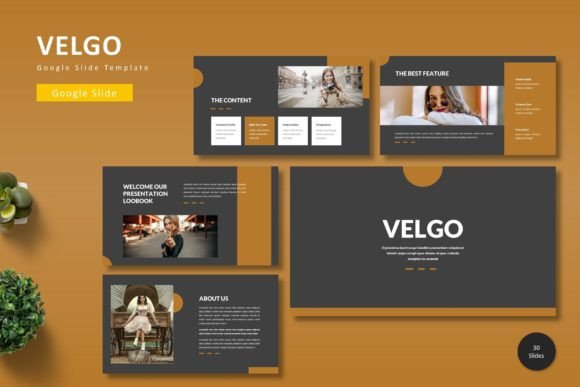
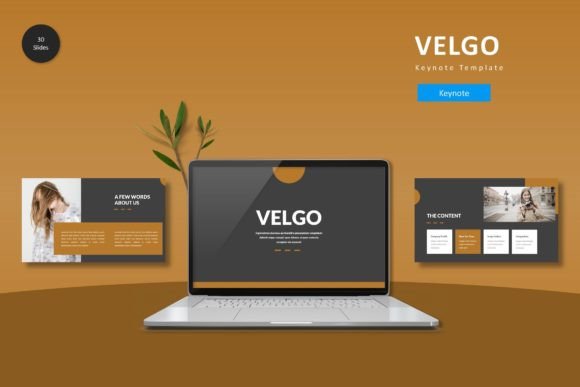
A common pitfall in presentation design is inconsistency. One slide features a bold infographic, the next relies on plain text, and the visual rhythm breaks. The Velgo Keynote Template solves this by offering a unified design language across all its layouts. With 30 slides per color template and section breaks included, you can maintain a professional flow throughout your deck. This is particularly valuable for marketers and small business owners who need to present a polished brand identity without spending hours manually aligning elements.
The template’s 5 premade color schemes allow you to tailor the look to different audiences or brand guidelines quickly. Instead of rebuilding your slides for a new campaign or client, you can select the color variation that best fits the context. This flexibility supports creative experimentation while keeping the foundational structure intact. You get variety without sacrificing the visual harmony that helps your message resonate.
Handcrafted Infographics and Editable Graphics
Data visualization is a powerful tool, but creating custom infographics often requires design skills and software beyond Keynote. Velgo includes handcrafted infographics that are fully resizable and editable. This means you can communicate complex information clearly without relying on external tools. An educator explaining statistical trends or a consultant presenting market research can use these graphics to make their points more memorable.
The pixel-perfect illustrations also mean you don’t need to worry about quality loss when scaling elements. Every graphic is designed to remain sharp, whether viewed on a laptop screen or a large presentation monitor. For freelancers and solopreneurs who wear many hats, this built-in asset library reduces the need to source stock graphics or hire a designer for every pitch.
Picture Placeholders and Drag-and-Drop Simplicity
One of the most practical aspects of the Velgo Keynote Template is its use of picture placeholders. Instead of manually cropping and resizing images, you can simply drag and drop your photos into the designated frames. This feature is especially useful for publishers and bloggers who frequently update visual content. It ensures that every image is consistently placed and proportioned, maintaining a clean layout without repeated adjustments.
Portfolio and gallery slides are also included, which is a benefit for creative professionals. Photographers, artists, and designers can showcase their work in a structured way that directs focus to the visuals themselves. The template handles the layout, allowing you to present your projects with confidence.
Who Benefits Most from Velgo’s Design System
This template is well-suited for a range of users, but certain groups will find it especially valuable. Entrepreneurs and business owners often need to produce presentations quickly for investor meetings, team updates, or sales calls. The comprehensive slide deck of 150 slides means you likely have a layout for almost every scenario. You can focus on refining your message rather than formatting each slide.
Marketing professionals and agencies will appreciate the ability to create cohesive campaign presentations across multiple brands or products. The 5 color variations allow each deck to feel distinct while maintaining a professional standard. Similarly, educators and trainers can leverage the structured layouts to build consistent course materials. Students and participants benefit from a predictable visual flow that aids comprehension.
That said, the Velgo Keynote Template is built on a structured design system. If your presentation style relies on highly experimental, deconstructed layouts or complete creative freedom without guidelines, you may find the predefined slides a helpful starting point rather than a finished product. The master slides-based approach makes global edits straightforward, but customizing beyond the provided options still requires some design decisions on your part. For most users, this balance provides a solid foundation that speeds up the creation process without limiting your ability to personalize.
Delivering a Lasting Impression
The ultimate goal of any presentation is to communicate an idea effectively and leave a lasting mark on your audience. Velgo helps you achieve this by removing the friction of design and formatting. When every slide feels intentional and visually cohesive, your audience can focus entirely on your content. The section breaks help organize your narrative into clear chapters, making complex topics easier to follow.
Whether you are pitching a new product, delivering a keynote speech, or teaching a class, the quality of your visual support reflects your professionalism. Using a well-crafted template like Velgo signals that you value clarity and attention to detail. Over time, this can strengthen your credibility and make your presentations more persuasive.
Getting Started and What to Expect
The main file includes 5 Keynote items, each containing 30 slides with a dedicated color scheme. The folder also includes a Readme First document that outlines font and photo information, helping you avoid common setup issues. Note that preview images are not included, so you can insert your own photos without unwanted extras.
Because the template is based on master slides, you can modify fonts, colors, and layouts globally with minimal effort. This efficiency is a significant advantage for professionals who need to update existing presentations for new contexts. A single change propagates through the entire deck, saving you hours of manual work.
The Velgo Keynote Template offers a practical solution for anyone who wants to produce high-quality presentations consistently. By providing a complete design system with editable graphics, multiple color schemes, and thoughtful layouts, it supports your creative process while respecting your time. For professionals, creators, and educators who value both efficiency and visual polish, this template provides a reliable framework to build upon.