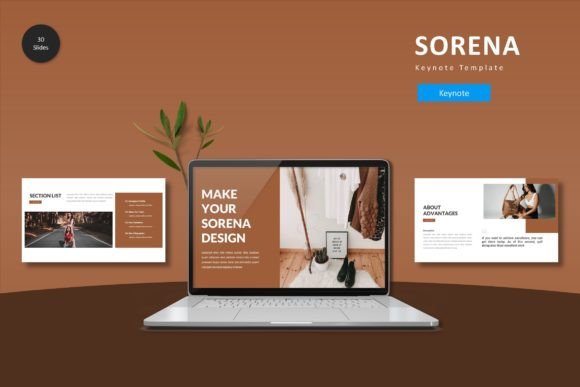
Sorena Keynote Template for Polished Presentation Design and Workflow Flexibility
Design Philosophy Behind the Sorena Keynote Template
The Sorena Keynote Template is built around the idea that a presentation should feel cohesive without being rigid. Many templates lock users into a single visual direction, but this design approach prioritizes adaptability. The template provides a foundation of 150 total slides distributed across five premade color variations, with 30 slides per color scheme. This structure allows the presenter to maintain visual consistency while still having room to inject personal branding or campaign-specific elements.
What makes this template stand out is its reliance on master slides. Master slides act as the backbone of the entire deck. When you adjust a master slide, every slide using that layout updates automatically. This feature saves significant time when you need to change fonts, adjust color accents, or reposition logos across a large presentation. The Sorena template leverages this functionality so that even users with limited design experience can produce professional-looking slides without touching every page individually.
Another core aspect of the design philosophy is the inclusion of section break slides. These slides serve as visual pauses between different parts of your presentation. Rather than jumping abruptly from one topic to the next, section breaks give the audience a moment to absorb information and mentally prepare for the upcoming content. The template includes these breaks in each color variation, ensuring that the transition slides feel like a natural part of the overall visual language.
Business Professionals and Corporate Presenters
For business professionals, time is often the limiting factor when preparing quarterly reports, investor pitches, or internal training materials. The Sorena Keynote Template reduces the time spent on formatting by providing prebuilt layouts that are ready to receive content. The picture placeholders with drag-and-drop functionality mean you can insert company logos, product images, or team photos without resizing or cropping manually. This efficiency is especially valuable when you need to produce multiple presentations under tight deadlines.
Corporate users also benefit from the handcrafted infographic slides. Instead of building charts and process diagrams from scratch, you can adapt the template infographics to represent your data. The infographics are fully resizable and editable, so you can change colors to match your brand guidelines or adjust shapes to reflect your specific metrics. This flexibility ensures that your data visualization looks intentional rather than generic.
Educators and Researchers
Educators and researchers often need to present complex information in a way that is digestible for students or conference audiences. The gallery and portfolio slides included in the Sorena template are particularly useful for showcasing case studies, research findings, or visual examples. You can arrange images in a grid or highlight key visuals without overcrowding the slide.
The template also supports a clean typographic hierarchy, which is essential when presenting detailed data or academic content. By using the built-in text styles and master slide formatting, you can ensure that headings, subheadings, and body text remain consistent throughout your presentation. This consistency helps your audience follow your argument without being distracted by formatting inconsistencies.
Creative Professionals and Designers
Creative professionals often judge templates by their visual polish and flexibility. The Sorena Keynote Template delivers pixel-perfect illustrations that hold up on high-resolution displays and projectors. All graphic elements are vector-based, meaning you can scale them without losing quality. This is particularly important for designers who want to repurpose shapes or icons across different slide layouts.
Designers also appreciate the ability to customize fonts and colors effortlessly. The template does not lock you into a specific typeface. You can switch fonts globally through the master slides, which updates every text element simultaneously. The five color variations provide a starting point, but you can modify individual colors to create a custom palette that aligns with a specific brand or event theme.
Working with Master Slides
The efficiency of the Sorena template comes from its master slide architecture. When you open the template in Keynote, the master slides are organized in a logical sequence. You can access them through the slide layout panel and make global edits. For example, if you decide halfway through building your presentation that the accent color should be darker, you can update that color on the master slide, and all slides using that master will reflect the change instantly.
This workflow is particularly useful when you are collaborating with a team. Different team members can work on separate slide sections, and the master slide ensures that everyone follows the same visual rules. The template includes 30 slides per color scheme, which covers common presentation needs such as title slides, content slides, quote slides, and section breaks. You do not need to design additional layouts unless your content requires something unique.
Handling Images and Media
The picture placeholders in the template are designed for simplicity. You drag an image file onto the placeholder, and it automatically fits within the designated area. This prevents distorted images or awkward cropping. The placeholders work with both photos and illustrations, so you can mix media types without worrying about alignment.
For users who require gallery or portfolio slides, the template provides multiple layout options. You can choose a grid layout for showcasing multiple images or a single-feature layout for highlighting one key visual. These slides are already formatted with consistent spacing and margins, which saves the effort of manually aligning objects.
Color Variation and Brand Alignment
The five premade color schemes serve as a starting point for different presentation contexts. A darker color scheme might work well for evening events or product launches, while a lighter scheme suits daytime conferences or educational settings. However, the template does not force you to stick with these preset colors. Each color is adjustable, and because the colors are linked through the master slides, you can create a completely new palette without editing individual slides.
When selecting a color scheme, consider the viewing environment. Presentations on large screens with ambient light benefit from higher contrast. The Sorena template includes both light and dark variations, so you can choose based on your venue. The handcrafted infographics also adapt to the color scheme, ensuring that charts and diagrams remain legible regardless of the background.
Pitching to Investors
Investor pitches require a balance of clarity and visual impact. The Sorena Keynote Template provides section break slides that help segment your pitch into clear parts: the problem, the solution, the market, the team, and the financials. Each section break gives the audience a moment to reset their attention. The infographic slides can be used to display market size, growth projections, or competitive analysis without overwhelming the viewer with numbers.
One practical observation from users is that the template helps reduce the number of slides needed to convey an idea. Because the layouts are designed with generous spacing and clear visual hierarchy, you can often communicate a point with fewer words. This brevity is appreciated in pitch settings where time is strictly limited.
Training and Onboarding Sessions
Training presentations benefit from repetition and structure. The Sorena template allows you to build a consistent visual language across multiple training modules. When employees see the same slide layouts and color schemes in each session, they subconsciously recognize the material as part of a cohesive program. The portfolio slides can be used to show examples of correct and incorrect procedures, while the infographics simplify step-by-step workflows.
Another advantage for training contexts is the drag-and-drop picture placeholder. Trainers can quickly swap screenshots or diagrams without rebuilding slides. This is especially useful when training materials need to be updated frequently to reflect new software versions or policy changes.
Conference Presentations
Conference presenters often face the challenge of making their slides readable in large rooms with varying lighting conditions. The Sorena template addresses this through its careful attention to contrast and font size. The pixel-perfect illustrations remain sharp even when projected on large screens. The section break slides also serve as natural transition points when you switch speakers or topics during a panel.
Presenters who travel frequently appreciate that the template is contained within a single Keynote file. All 150 slides, along with the color variations and master slides, are stored in one place. You do not need to carry multiple files or worry about missing linked assets. The readme file included in the folder provides additional guidance on fonts and photo attribution, which is helpful when preparing files for handoff to event organizers.
Font Licensing and Availability
The template relies on specific fonts to achieve its intended look. The included readme file specifies which fonts are used and where they can be obtained. Some fonts may be free for personal use but require licensing for commercial presentations. It is your responsibility to verify that you have the proper licenses for any fonts you use in a presentation, especially if the presentation will be distributed publicly or used in a paid event.
If you switch fonts through the master slides, keep in mind that different fonts have different character widths. A headline that fit perfectly in one font may wrap to two lines in another. It is advisable to test font substitutions on a few key slides before applying them globally.
Image Usage and Attribution
The preview images shown in the template demo are not included in the purchased file. You will need to supply your own photos or purchase stock images separately. The picture placeholders are sized to accommodate common aspect ratios, but you may need to crop or adjust your images for the best fit. The template does not include stock images, so plan your image sourcing ahead of time to avoid last-minute scrambling.
Learning Curve for New Keynote Users
While the template is designed to be user-friendly, working with master slides does require some familiarity with Keynote's interface. If you are new to Keynote, spend a few minutes reviewing how master slides work before making global changes. The template folder includes a readme file that explains the basic structure. Once you understand that editing a master slide updates all associated slides, you will be able to customize the template efficiently.
For users who are experienced with Keynote, the template offers a high degree of flexibility. You can duplicate slides, rearrange sections, and combine elements from different color schemes. The five color variations are stored in separate groups, but you can mix and match them if you need a custom palette for a specific slide.
Final Observations on Presentation Workflow
The Sorena Keynote Template addresses a common pain point in presentation design: the tension between visual quality and time constraints. By providing 150 slides with consistent master slide logic, it allows you to focus on your message rather than on formatting. The inclusion of handcrafted infographics, section breaks, and portfolio layouts covers the majority of presentation scenarios without requiring additional design work.
One of the strongest aspects of this template is its adaptability across different user groups. A business professional can use it for a quarterly review, an educator can adapt it for a lecture, and a designer can use it as a starting point for a client project. The five color variations provide enough visual diversity that your presentation will not look like a generic template, even if you stay within the preset schemes.
When planning your next presentation, consider how much time you typically spend on formatting and slide alignment. If that time could be better spent refining your content or practicing your delivery, a template like Sorena becomes a practical tool rather than just a design asset. The investment in understanding the master slide workflow pays off each time you need to produce a polished presentation under real-world deadlines.