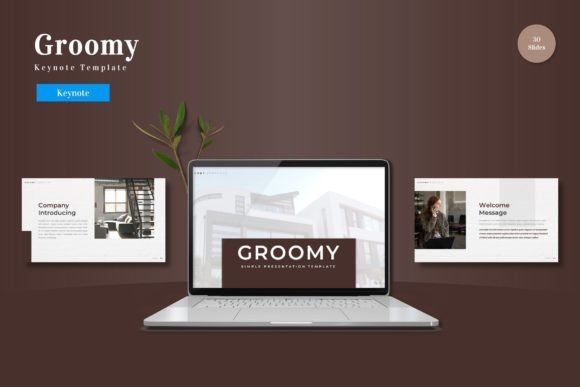
Designing Better Presentations with the Groomy Keynote Template
Building a presentation from a blank canvas is rarely the fastest path to a clear message. The friction of aligning text boxes, sourcing icons, and manually maintaining visual flow distracts from the substance of your content. For professionals who need to communicate ideas effectively, a structured template system is not a design crutch—it is a workflow accelerator. The Groomy Keynote Template provides a comprehensive architecture of 150 total slides across 5 premade color schemes, designed to bridge the gap between raw information and a polished, audience-ready deck. This article explores how Groomy fits into a practical presentation workflow, from preparation through long-term reuse.
Preparing for a Cohesive Visual Narrative
The most time-consuming part of building a deck is often the setup. Choosing a color palette, establishing typography hierarchy, and deciding on layout grids can consume hours before you even place your first piece of content. Groomy removes this overhead by providing a complete, pre-built visual system. With 30 slides per template section and a handcrafted set of infographics, the template functions as a strategic foundation rather than a simple collection of pages.
In the preparation phase, you can map your narrative structure directly onto the available slide types. Knowing that you have dedicated section break slides, portfolio layouts, and data visualization tools allows you to plan your story arc in advance. This upfront planning reduces revision cycles later. The 5 color variations are a particularly useful feature for workflow planning. Instead of making color decisions on the fly, you can select a scheme that aligns with your brand or topic before you begin editing. This locks in a visual identity from the start, preventing the common tendency to constantly tweak colors as you work.
Reducing Decision Fatigue with Master Slides
Groomy is built on Master Slides, which is a critical detail for anyone who values efficiency. Master Slides allow you to make a global change—such as updating a font or repositioning a logo—across all slides in seconds. For a 150-slide deck, this feature alone can save hours of manual adjustment. It ensures that you spend your mental energy on your message, not on maintaining visual consistency. During preparation, taking five minutes to customize the Master Slides to your brand standards sets a consistent foundation that will carry through every subsequent slide you create.
Integrating Groomy into the Content Development Workflow
Once your narrative structure and visual foundation are set, the real work begins: populating the deck with your specific content. This is where Groomy's design features directly support a smooth execution phase. The template includes picture placeholders that use a simple drag-and-drop mechanism. Instead of manually cropping and resizing images, you can drop your photos directly into pixel-perfect frames. This is a significant efficiency gain for entrepreneurs building pitch decks or for marketers assembling campaign presentations.
Data Visualization and Infographics
Presenting data clearly is a common challenge in business communication. Groomy includes handcrafted infographics that are fully resizable and editable. This means you are not limited to static charts. You can adapt the infographic components to match your specific metrics, timelines, or process flows. For a quarterly review or a strategic proposal, having pre-built visual elements that you can customize on the fly keeps you in a productive flow state. You do not need to switch to a separate design tool to create compelling visuals.
Maintaining Consistency Across Long Decks
As your deck grows, consistency naturally degrades. Font sizes shift slightly between slides, colors drift, and alignment becomes uneven. Groomy addresses this through its structured layout system. All graphic elements are resizable and editable, but they are anchored to a grid that maintains proportion and spacing. This built-in quality control is invaluable for educators and freelancers who may not have a dedicated design team to review their work. The template ensures that every slide meets a professional standard, allowing you to focus on the accuracy and clarity of your content.
Practical Workflow Examples for Different Roles
The versatility of the Groomy template makes it suitable for a wide range of professional contexts. Here are three practical scenarios where the template integrates smoothly into specific workflows:
- For Entrepreneurs and Startup Founders: When preparing a fundraising deck, narrative flow is critical. Use the section break slides to clearly delineate between the problem, solution, market size, and financial projections. The gallery and portfolio slides can showcase product mockups or early traction metrics. The 5 color schemes allow you to match your deck to your existing brand identity without starting from scratch.
- For Marketing and Agency Teams: Client presentations often require a balance between data and storytelling. The handcrafted infographics are ideal for presenting campaign results or market research. The picture placeholders allow for quick insertion of creative assets, mockups, or team photos. The pixel-perfect illustrations ensure that the deck looks polished when presented on large screens.
- For Educators and Trainers: Long training decks need to be visually engaging without being distracting. The 30 slides per template section provide ample layouts for structuring a full workshop. The consistent layout patterns help learners focus on the content rather than navigating changing design elements. Section breaks can signal transitions between topics, improving the pacing of your session.
Post-Project Organization and Long-Term Asset Management
A presentation template is only valuable if it can be reused efficiently. The Groomy package includes a clearly structured folder containing 5 KEY files, 30 individual slide files, color scheme assets, and a Readme First document with font information. This organizational structure is important for professionals who manage multiple projects over time.
After completing a presentation, you can archive the final deck separately while keeping the base template ready for the next project. Because the template is based on Master Slides, you can quickly adapt it to new brands or topics by changing the color scheme and updating the master elements. This long-term reusability makes Groomy a practical investment for small business owners and freelancers who frequently create presentations but want to avoid the repetitive overhead of designing from scratch each time.
Compatibility and Setup Considerations
Before diving into your project, it is important to review the Readme First document included in the folder. This file contains information about the required fonts and how to properly install them for optimal rendering. Taking ten minutes to read this documentation and set up your assets correctly will prevent formatting issues later in your workflow. Groomy is designed specifically for Keynote, leveraging its native features for smooth performance. For teams collaborating across platforms, saving your final deck in compatible formats ensures that the visual integrity is preserved during review cycles.
Integrating with Broader Content Creation Systems
Groomy does not exist in isolation. It interacts well with standard content creation tools and resources. For example, you can pair the template with stock photography, custom icon sets, or brand style guides to further refine your presentation. The picture placeholders are designed to accept standard image formats, making it easy to drop in assets from your existing media library. If you use project management tools to track your content creation milestones, the structured nature of this template allows you to estimate slide production time more accurately. Knowing that you have pre-designed layouts for data, images, and text means you can focus your workflow on writing copy and gathering assets, rather than on layout engineering.
Maintaining Quality Control Throughout the Process
Quality control in presentation design often comes down to attention to detail. Groomy supports this by providing consistent spacing, aligned elements, and a unified visual language across all 150 slides. When you edit a slide, you do not need to check every other slide for ripple effects because the Master Slide structure maintains global consistency. For professionals delivering high-stakes presentations, this assurance is valuable. It allows you to review your content for accuracy and tone, confident that the visual layer is already polished.
From the initial preparation of your narrative structure to the final export of a cohesive deck, the Groomy Keynote Template streamlines the entire process. It reduces setup time, maintains consistency during content development, and provides reusable assets for long-term use. For entrepreneurs, marketers, educators, and any professional who relies on presentations to communicate ideas, integrating a structured template like Groomy into your standard workflow is a practical step toward more efficient and more effective communication.