Maze - Keynote Template
Every presentation you create carries weight. Whether you’re pitching a product to investors, walking a client through quarterly results, or teaching a team a new process, the structure and visual consistency of your slides affect how your message lands. The Maze - Keynote Template is a flexible design system designed to help you build presentations that feel cohesive without requiring hours of manual formatting. It is not a one-size-fits-all deck. Instead, it is a foundation you can customize to fit the specific needs of your project, audience, and workflow.
If you have ever found yourself wrestling with inconsistent fonts, misaligned graphics, or slides that simply do not flow together, you understand how much time those small issues consume. This template addresses that friction directly. Let’s walk through how it works, where it fits into real professional routines, and how you can integrate it into your own process.
What the Maze - Keynote Template actually provides
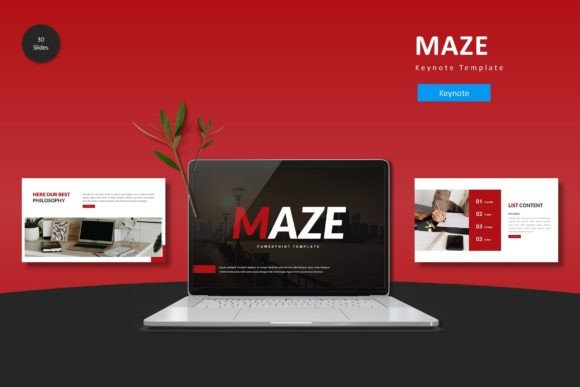
At its core, this template gives you 150 total slides spread across five pre-built color schemes. That means you get 30 slides per color variation, plus additional section break slides and a dedicated gallery and portfolio slide. Every element — from infographics to illustrations — is built on master slides, so when you adjust a font or color at the theme level, the change propagates across the entire deck. This is not a collection of disconnected slides. It is a modular system you can mix, match, and reuse.
The template includes:
- Five complete Keynote files, one for each color scheme
- 30 slides per file, covering common presentation needs like title layouts, content slides, data visuals, and portfolio sections
- Section break slides to help you organize longer decks into clear segments
- Handcrafted infographics that are resizable and fully editable
- Picture placeholders that let you drag and drop images without breaking alignment
- Pixel-perfect illustrations that remain sharp at any size
All graphic assets are resizable and editable. Nothing is locked down. You can change colors, swap images, replace icons, and adjust layouts as needed. The readme file gives you font and photo information so you can maintain consistency if you add your own assets later.
Where this template fits in a broader workflow
Think of the Maze - Keynote Template as a pre-built infrastructure for your presentation process. It is most useful at two points: before you start building slides and during the final polish phase. However, it also supports work that happens after a presentation is delivered, especially if you reuse and adapt decks over time.
Before you build: planning and preparation
When you begin a new presentation, your first instinct might be to open Keynote and start designing from scratch. That approach usually leads to inconsistency. You pick a font, then change your mind halfway through. You resize an image and accidentally shift the alignment on every subsequent slide.
With the Maze template, you start with a palette and layout system already in place. Choose one of the five color schemes that matches your brand or the tone of your talk. If none of the five are exact, you can use any of them as a starting point and adjust colors globally using master slides. That small decision — picking a pre-made scheme rather than building from nothing — saves you fifteen to thirty minutes immediately.
During the preparation phase, you can also use the section break slides to outline your narrative. Before filling in content, drop a section break slide between each major part of your story. This forces you to think about structure before you get lost in details. The template becomes a planning tool, not just a design asset.
During construction: integration with content and tools
As you build your deck, the template works alongside your existing content creation process. The picture placeholders are one of the most practical features. Instead of manually cropping and positioning every image, you drag a photo into the placeholder, and it snaps into place. This works especially well if you are pulling images from a shared asset library, your own photography, or stock sources.
The infographics are another time-saver. If you frequently present data — growth metrics, survey results, timelines — the handcrafted charts and diagrams give you a starting point that looks polished. You edit the numbers and labels directly, without needing to build a chart from scratch. For marketers and entrepreneurs who report on campaigns or revenue, this alone can cut slide creation time in half.
If you collaborate with a team, the template helps maintain consistency across contributors. When multiple people work on different sections of a deck, each person can use the same master slides and color scheme. The end result looks like one person designed it, even if four people contributed content. Freelancers and agencies will find this useful when handing off presentation files to clients who need to make edits later.
After delivery: reuse and adaptation
One of the overlooked aspects of a good template is how it supports long-term use. Once you build a deck using the Maze template, you have a reusable structure. The next time you need a presentation, you duplicate an existing file, swap out content, and adjust colors if needed. The portfolio and gallery slides are particularly useful if you deliver multiple client pitches or project recaps over time. You keep the same visual language, so your presentations build a recognizable identity.
If you are an educator or blogger who creates recurring content — monthly webinars, course modules, or conference talks — having a consistent template reduces the mental overhead of designing from scratch each time. You focus on the content, and the template handles the visual foundation.
Practical implementation tips
Getting the most out of this template requires a few deliberate choices. Here are some approaches that work well in real workflows.
Start with the color scheme that matches your brand, then modify
The five included color schemes cover a useful range, but they may not match your exact brand. Instead of picking one and forcing it, select the scheme that is closest in tone to what you need. Then open the master slides and adjust the palette. Because the template is based on master slides, one change updates every slide that uses that color. This takes about five minutes and gives you a fully branded deck without altering individual slides.
Use section breaks to improve audience retention
Long presentations can lose momentum. The section break slides in this template are designed to signal transitions. When you move from one topic to another, use a full-width break slide that states the next section title. This gives your audience a moment to reset mentally. For a 45-minute deck with five sections, you get four natural pauses. That small structural decision improves how your message is received.
Keep your images consistent with the placeholder dimensions
The picture placeholders are designed around specific aspect ratios. When you drop an image into a placeholder, it crops to fit. To avoid awkward cropping, pre-crop your images to roughly the same aspect ratio before dragging them in. This is a minor step, but it ensures that your gallery and portfolio slides look intentional rather than random.
Edit infographics directly rather than rebuilding them
The infographics in the template are handcrafted and fully editable. If you need to change a bar chart from showing revenue to showing user growth, you can select the individual elements and edit the numbers. Do not delete the graphic and start over. The value of the template is that the design work is already done. You only need to update the data.
How it interacts with other tools and resources
The Maze - Keynote Template is specifically built for Apple Keynote, so it works best within the macOS ecosystem. If your workflow involves exporting to PowerPoint or Google Slides, be aware that some master slide behaviors may shift. For most static content — text, images, basic shapes — the transition is smooth. Complex infographics or layered illustrations may need minor adjustments after export.
For teams that use cloud storage, keep the template file in a shared folder so everyone accesses the same version. If you use a digital asset management system for photography or brand assets, link your placeholder images from that library to maintain consistency across decks.
The template also pairs well with presentation planning tools like mind maps or outlining apps. Use an outliner to structure your story before you open Keynote. Then use the section break slides from Maze to map that structure onto your slide deck. This separation of planning from design keeps you efficient and prevents you from designing slides before you know what you want to say.
Long-term considerations and quality control
A template like this is only as good as how consistently you use it. Over time, you may be tempted to mix slides from different color schemes or bring in external assets that do not match the visual language. That is fine for one-off adjustments, but if you maintain a library of presentations, stick to one color scheme as your default. This builds a visual identity that your audience begins to recognize.
The pixel-perfect illustrations in the template scale without losing quality. This matters when you present on different screen sizes — a laptop, a projector, or a large monitor. Test your slides on the largest screen you will use before the actual presentation. If any text or graphic elements look too small, adjust them at the master slide level rather than editing each slide individually.
For quality control, review your deck in presentation mode before delivery. Check that all picture placeholders contain images and that no placeholder borders are visible. Confirm that your font choices match the readme recommendations so you do not end up with missing fonts on a different machine.
Who benefits most from this approach
This template fits naturally into the routines of professionals who create presentations regularly but do not have dedicated design support. Marketers who build monthly campaign recaps, entrepreneurs who pitch to investors, educators who develop course materials, and freelancers who present portfolios to clients will all find it useful. It also works well for small business owners who need to maintain a professional image without hiring a designer.
For productivity-minded users, the value is straightforward: less time spent on formatting, more time spent on content and delivery. If you deliver ten presentations per year and the template saves you thirty minutes per deck, that is five hours of time returned over the year. That is time you can spend refining your message, practicing your delivery, or working on other parts of your business.
The Maze - Keynote Template is not a magic fix for weak content or poor preparation. No template can replace clear thinking and a well-structured narrative. What it does is remove the visual friction that distracts from your message. When your slides look consistent and professional, your audience focuses on what you say, not on the misaligned title on slide fourteen. That is the practical outcome this template delivers, and it is why it belongs in any professional presenter’s toolkit.