Customizable Workbook Canva Templates for Streamlined Branding
Creating consistent, professional content for your audience takes time. Whether you are building an online course, developing a client resource, or organizing your own projects, the visual and structural quality of your workbooks matters. Well-designed workbooks do more than present information. They build trust, improve comprehension, and keep people engaged. Customizable workbook Canva templates offer a practical path to achieving that quality without needing advanced design skills or expensive software.
What Makes a Workbook Template a Smart Choice
A workbook is not just a collection of pages. It is a tool that guides someone through a process, helps them reflect, or supports them in reaching a goal. When you use a template, you start from a structure that already works. Instead of deciding layout, spacing, and hierarchy from scratch, you focus on your content. This efficiency matters for anyone who regularly produces educational or planning materials. You save hours per project, and those hours add up quickly.
With customizable workbook Canva templates, you also gain flexibility. You can adjust every element to match your brand. Colors, fonts, imagery, and page order are all under your control. The result is a finished product that feels intentional and cohesive, not generic.
Practical Benefits That Support Your Daily Work
The value of these templates goes beyond aesthetics. They help you work more efficiently, communicate more clearly, and maintain a professional image across all your materials.
Time Savings Without Sacrificing Quality
Starting from a blank page is rarely the fastest route. Even if you know design principles, building a well-structured workbook takes significant effort. Templates eliminate the guesswork. You receive a complete set of pages with thoughtful layouts and design elements already in place. You adjust the content to fit your needs, and you are ready to publish or share. For a small business owner, freelancer, or educator, that means more time for client work, content creation, or strategic planning.
Because these templates are built for Canva’s free version, there are no additional costs or subscription requirements. You open the template, make your changes, and export your final file. The process is straightforward and repeatable.
Brand Consistency Across All Materials
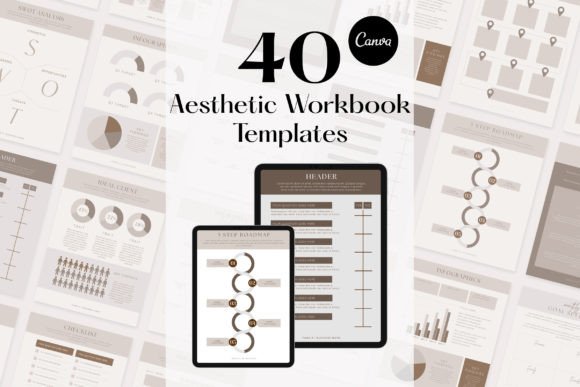
When your workbooks, planners, and guides share a consistent look, your audience recognizes your materials instantly. Consistency builds professional credibility. If you use mismatched fonts, colors, or layouts, your content can feel fragmented. Customizable workbook Canva templates let you set your brand colors and fonts once, then apply them across all forty templates. This uniformity strengthens your visual identity whether you are creating a goal tracker, a challenge checklist, or a roadmap for a new project.
For bloggers, course creators, and small business owners, this consistency extends to your website, social media graphics, and email resources. When everything aligns visually, your audience perceives a more polished and reliable brand.
Versatility Across Different Needs
Workbooks serve many purposes. You might need a planner to help clients map out their quarter, a checklist for a step-by-step process, or a reflection guide after a workshop. The same template set can cover all these scenarios. With pages dedicated to checklists, Q&A, goal trackers, planners, challenges, infographics, roadmaps, and notes, you have a toolkit that adapts to different projects and audiences.
This universal nature makes the templates suitable for a wide range of activities. A coach can use them for client exercises. An educator can create supplementary materials for students. A marketer can design lead magnets that offer real value. The structure supports each use case while letting you customize the content and visual tone.
Who Benefits Most from These Templates
While anyone producing workbooks can gain from templates, certain groups find them especially helpful.
Small business owners and entrepreneurs often juggle multiple roles. They need to create professional materials quickly without hiring a designer. Templates give them control over their brand presentation while freeing time for other priorities. A yoga instructor, for example, could create a goal-setting workbook for clients in an afternoon rather than a week.
Educators and course creators regularly need structured resources that support learning. Workbooks with planners, trackers, and reflection prompts help students stay organized and absorb material more deeply. Instead of building each workbook from scratch each term, you can adapt your templates to new content quickly.
Bloggers and content creators use workbooks as lead magnets, email opt-ins, or bonus content. A well-designed workbook encourages downloads and builds your email list. Because the templates are fully customizable, you can match the workbook style to your blog aesthetic without extra effort.
Freelancers and consultants often provide clients with planning tools, frameworks, or action guides. Presenting these materials in a polished, branded workbook elevates your professionalism and reinforces the value of your services.
Understanding What You Can Customize
Knowing what you can change helps you assess whether a template set meets your needs. These Canva templates allow full editing of text, colors, images, and design elements. You are not limited to a few preset options. You can move, add, or delete any element on any page. This control means you can adapt a single template for multiple projects without anyone noticing it is the same base design.
For example, if you like the layout of a goal tracker page but need it for a client workshop, you can change the color scheme, add your logo, and adjust the prompts. If you prefer a different type of chart or infographic, you can swap elements from other templates or bring in your own assets. The flexibility supports both beginners who want simple edits and experienced users who want deeper customization.
How to Get Started and What to Expect
After purchase, you receive a PDF document containing links to your Canva templates. Because the templates are designed for the free version of Canva, you do not need a paid subscription to edit or export them. You can access your templates from any device with a browser, making it easy to work on projects wherever you are.
Once you open a template, you can immediately start customizing. Change text to match your content, adjust colors to align with your brand, and replace placeholder images with your own photos or graphics. If you need a different number of pages or a specific combination of layouts, you can duplicate pages, delete what you do not need, or mix elements from multiple templates. The process is intuitive, even for users with limited design experience.
Considering Limitations and Fit
No single resource fits every situation perfectly, and it is helpful to consider where these templates may not meet your exact needs. If you require highly specialized layouts, such as complex data tables or interactive digital features that go beyond static PDF content, you may need to supplement the templates with additional tools or custom design work. The templates are optimized for standard workbook formats like checklists, planners, trackers, and note pages. They work best for content that follows a clear structure and benefits from a consistent visual framework.
If your brand uses unconventional dimensions or specific print specifications, you should verify that the template sizes match your requirements. Canva allows you to resize designs, but some manual adjustments may be needed for non-standard formats. For most digital and standard print uses, the templates function well as delivered.
Practical Recommendations for Getting the Most Value
To maximize the return on your investment, it helps to approach the templates strategically. Start by defining the purpose of each workbook you create. Clarify who will use it and what you want them to gain. Then choose the page types that best support that goal. A personal development workbook for clients might focus heavily on goal trackers, challenges, and reflection prompts. An educational guide might emphasize checklists, infographics, and structured note pages.
Apply your brand elements consistently across all pages. Upload your logo, set your brand colors, and choose two or three fonts that you use throughout. This consistent application makes your workbooks feel like natural extensions of your other marketing materials. When you eventually create a new workbook, you can duplicate an existing template and replace only the text and images, keeping your brand framework intact.
Consider building a small library of customized templates over time. Once you adapt a template for one project, save it as a new Canva template. Over months, you accumulate a collection of ready-to-use workbooks that you can deploy at a moment’s notice. This approach turns your initial investment into a long-term efficiency gain.
Supporting Creativity Without Adding Complexity
One concern with using templates is that they might limit creativity or make your work look similar to others using the same product. With full customization, that concern is largely mitigated. You control every visual decision. Two people starting from the same base template can create workbooks that look completely different by choosing distinct color palettes, fonts, imagery, and content.
The templates provide a foundation, not a straightjacket. If you prefer a minimal look, you can remove decorative elements and keep only the functional structure. If you want a bold, colorful style, you can add your own graphics, adjust hues, and layer in visual interest. The starting point saves you time, but the final outcome reflects your unique approach.
A Tool for Long-Term Consistency and Growth
As your business or practice grows, maintaining consistent quality across more materials becomes more challenging. Workbooks you produce six months from now should feel like they come from the same source as those you produce today. By using customizable workbook Canva templates, you establish a repeatable process that scales with your needs. You can create workbooks faster, with fewer errors, and with greater confidence in the visual outcome.
Whether you are launching a new course, building a client onboarding packet, or creating a public resource for your audience, the right workbook structure strengthens your message. It helps people absorb information, take action, and connect with your brand. That is not just a design win. It is a practical advantage that supports your goals at every stage of your work.